A reading challenge is a set or subset of book titles in your catalogue suitable for all your students or for a specific group of students to read. It can be used to encourage reading in order to meet the "challenge". It could be a formal list of titles provided by an external educational jurisdiction or authority, or it could be a list of titles created internally for a local purpose. A challenge list is created in your catalogue by importing a CSV file.
Go to: Cataloguing > Bulk Update > Reading Challenge
For each authority type you can perform the following actions to achieve the described result:
- Note the CSV File expected in format.
- ISBN - used to identify a specific title in your catalogue. Note: ISBNs in the file and not in your catalogue will be ignored.
- Challenge - name of the challenge. Note: Only one challenge can be supported at a time.
- Year - the calendar year this challenge will be run. Note: To aggregate a new challenge with an earlier challenge, add the new titles to the previous CSV file.
- Booklist - displays a reading suitability for the title.
- Reading Challenge File - choose the CSV file from your local computer.
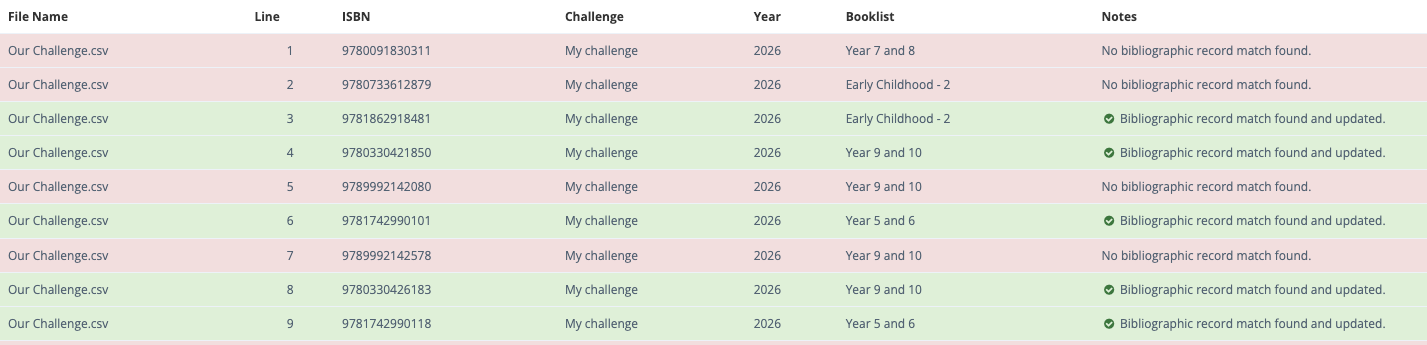
 - import your file to and process it against your catalogue. Note: Titles in your catalogue that match ISBNs in your CSV file will be matched and a summary report will display. Import and processing time depend on the number of records in both your collection and the CSV file.
 - When finished, a report will display successful (green) and unsuccessful (red) matches.
OPAC Display
Titles found in an OPAC search will display as either:
A message -  on the details display, or
An icon - on the title cover display.